Showing posts with label faster XML parsing. Show all posts

Monday, September 17, 2012


Accessing Expresso remotely: 

Check out our free developer version at http://www.sxml.com.au:8080/Expresso/login.jsp

The power of client code 

Expresso client code allows you to remotely interact with the Expresso Parser through your own application in either java or javascript. The amount of supported access languages will be extended in future to include C++, ruby and node.js among other languages.

Accessing expresso remotely 

Expresso client code is used to access the service. It is available for both XML parsing connections and web service modules and presently in java and javascript with JSON.

The client code generation page

 The expresso client code generation page is accessible by clicking on the 'client code' header.


When on the generation page select a language and select either XML connections or web services. Click generate. Client code is generated on the screen.


The client code is already populated with your username, company and the last connection or web service which you accessed as well as any web service parameters you supplied.

All you have to do is paste this code into your own project, add your access password (your normal Expresso account password) and start using the client code.

Java access through HTTPS

The java client code works as follows.
  1. The parameters needed for the request are created and given values.
  2. a HTTPS request is created using the URL of the Expresso Remote Parser.
  3. The HTTPS request is sent and the results are arranged in a three dimensional array.
  4. The outer array is for each rule which has been parsed. 
  5. The middle array contains each set of return set
  6. Each inner array contains each of the return types within the return set

Javascript access through JSON

The javascript client code works as follows.
  1. Within script tags a JSON request over HTTPS is created.
  2. The various required parameters are added to the JSON request
  3. The JSON request is sent and the result is available for processing

Updating client code graphically

You can modify your client code parameters using our graphical tool. When you generate client code simply click 'modify client code graphically' and you are brought to a page where you can update any parameter and the resulting client code is produced. 


Forms Wizard and dynamic parameter forms

Expresso allows you to create a HTML form and backing java servlet code. You can then publish this HTML code to your website where users can supply parameters values for XML parsing rules and have they stored XML file parsed with those parameters.
For example you might wish to create an XML parsing rule which is TAG = SHOP and tag value = "X" where X is a value entered by a user. With Forms you can easily do this. You can create  a form linked to a rule where the user enters a value for part of the rule.

To create a dynamic parameter form

  • Click on Forms header to get to the forms section. Choose the particular XML connection which you wish to create a form

  •  The rules associated with this XML connection are listed. You now go through each rule deciding whether to create form elements for that rule or not.
  • For each rule, you can choose a form element for any rule part.
  • Choose a field name for the form element.

 
  1. When you have chosen all the form elements the client code is created.
  2. You can paste this client code into your own project and start using it straight away.


Check out our free developer version at http://www.sxml.com.au:8080/Expresso/login.jsp


Monday, September 10, 2012

Getting started with Expresso parser 


Check out our free developer version at http://www.sxml.com.au:8080/Expresso/login.jsp


Today I will show you how to parse an XML file with Expresso.  We will be dealing with the visual aspect of parsing a file.


Register for a free developer account

  1. To register simply enter a username, password and a company. If you are not currently working add your username again in this field. 
  2. Choose free developer version and Click 'register'. 


Login to the site


  1. Enter your username, password and company and click 'login'. You will be brought to the dashboard


The dashboard
The main area is called the dashboard. this contains a list of all XML connections and web services which you have created. Each can be edited.


Create a new XML connection

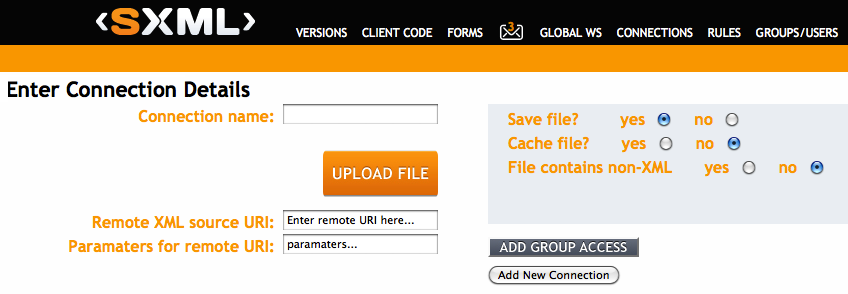
  1. In dashboard, click 'add new connection' and you are brought to a new page.
  2. Enter a name for the connection, upload or specify an XML file URI and choose settings and click save.
  3. The new connection will now be shown on the dashboard.


Create a new parsing rule 

  1. Click on the rules section of the connection listing to see a particular connection's rules.
  2. Click 'add new' to add a new parsing rule. A popup box appears. Fill in details.


  1. To search for child elements click 'add child'. A hierarchy of search rules can be created.
  2. You can return various aspects of an element including tagname, tag value, attribute name and attribute value.


  1. You can use regular expressions and mathematical operators in the search.
  2. You can search for child elements or descendants.
  3. Click save to save the rule. 
  4. Once you save a rule it appears on the right hand side of the screen. When you select a new connection only the selected connection's rules are shown. 


See results
1.  Click on a rule's run method to run the rule against the XML file. The results are shown on screen.


Check out our free developer version at http://www.sxml.com.au:8080/Expresso/login.jsp


XLM Parsing on the cloud

Why cloud parsing?

We choose to provide a cloud-based parser as we believe that the painful integration layer that companies go through can be minimized or avoided. 

My husband asked me once why companies buy third party software and still take months to start using it? 

My answer: The integration layer. 


What does cloud parsing mean for us?
Instead of downloading XML parser and adding it as a third party library to your existing project, you can simply register and login to our website and start parsing online. 

No more conflicts
This means that you can use our parser from any environment as long as you have a web browser!
There are no more conflict issues with JVMs, other 3rd party libraries or other parsers. 

We handle the complexity
If you are running your application on something like node.js then outsource all the mathematical complexity of XML parsing to us!! 
We handle the parsing and send your back your results over HTTPS. 


How to get started with Expresso parser 

  1. Register for a free developer version
  2. Login and click the browse button to upload an XML file or enter the URL of a HTTP based file.
  3. Click a button to open the graphical parser which lets you visually generate parsing rules.
  4. Click "run" to test your newly created parsing rule against the XML file you are using and see the results on screen.
How to connect with client code 
  1. After creating your rules you can connect remotely to the parser using java or javascript or JSON.
  2. Our client code generator creates client code specific to your user details and to the last XML connection you created.
  3. Simply paste this code into your project and immediately start connecting to the parser remotely.
  4. Results from each parsing can be returned as java arrays or as JSON objects.

How to share files 
  1. If you have a medium or large business with multiple users you can set up groups and roles graphically within Expresso.
  2. You can then use these groups and roles to share XML file connections and associated parsing rules securely among your team.
  3. You can use roles to limit access e,g, to read only.

How to access global Web services 
  1. We are creating a library of globally used web services which are set up using our parser.
  2. You can browse through these, choose web services you like and add them to your parsing suite.
  3. You can then graphically modify the web service method used and any parameters and consume the web service from the parsing suite and remotely using client code. 


Check out our free developer version at http://www.sxml.com.au:8080/Expresso/login.jsp